Automatic detection
Connect a monitor and Brightness Control finds its brand, model, and hardware controls.
Control every compatible display independently from one clean Windows app. No menus, no installation, no fuss.
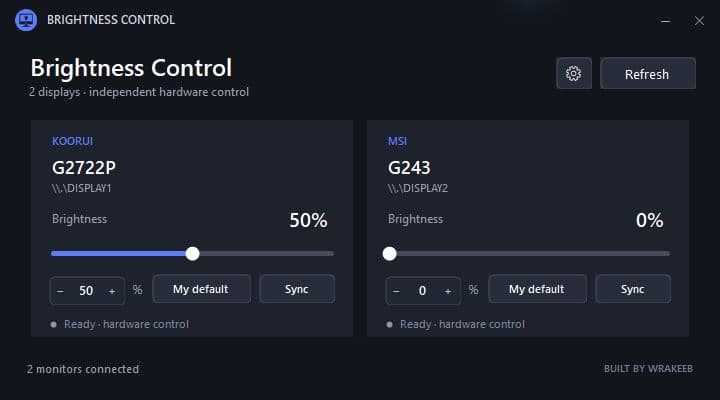
Everything you need to manage brightness, without the clutter you don't.
Connect a monitor and Brightness Control finds its brand, model, and hardware controls.
Brightness changes instantly while you drag. Smooth, direct, and made for everyday use.
Save a preferred level for each display and optionally restore it every time the app starts.
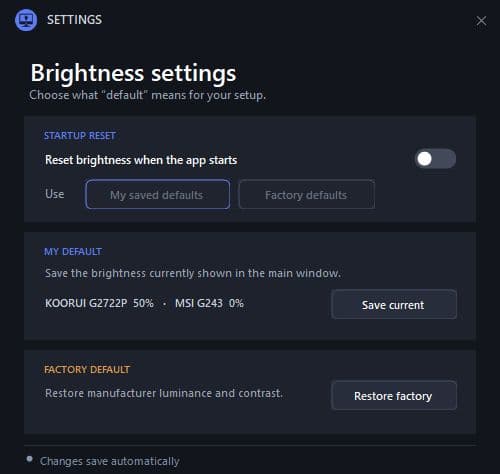
Save the brightness that feels right for each monitor. Restore your setup on demand or automatically when Brightness Control starts.
Get the single portable executable from GitHub.
Open the app. Your connected displays appear automatically.
Move each slider and enjoy a more comfortable workspace.
Brightness Control uses your monitor's DDC/CI hardware interface over common display connections. It supports single-display desks and larger multi-monitor setups alike.
Read compatibility notesFree, portable, and ready whenever your eyes need a change.
Download Brightness Control